Virtual Worlds
SPACEX FALCON 9 LAUNCH COMPLEX:
AN EDUCATIONAL THREE.JS 3D GAME WORLD
Walk a free 3D SpaceX Falcon 9 launch complex in an over-the-shoulder third-person view, collect a gem at every landmark and learn how a rocket launch site works. A Three.js 3D browser game built with WebGL, with nothing to install.
· Updated · Game overview
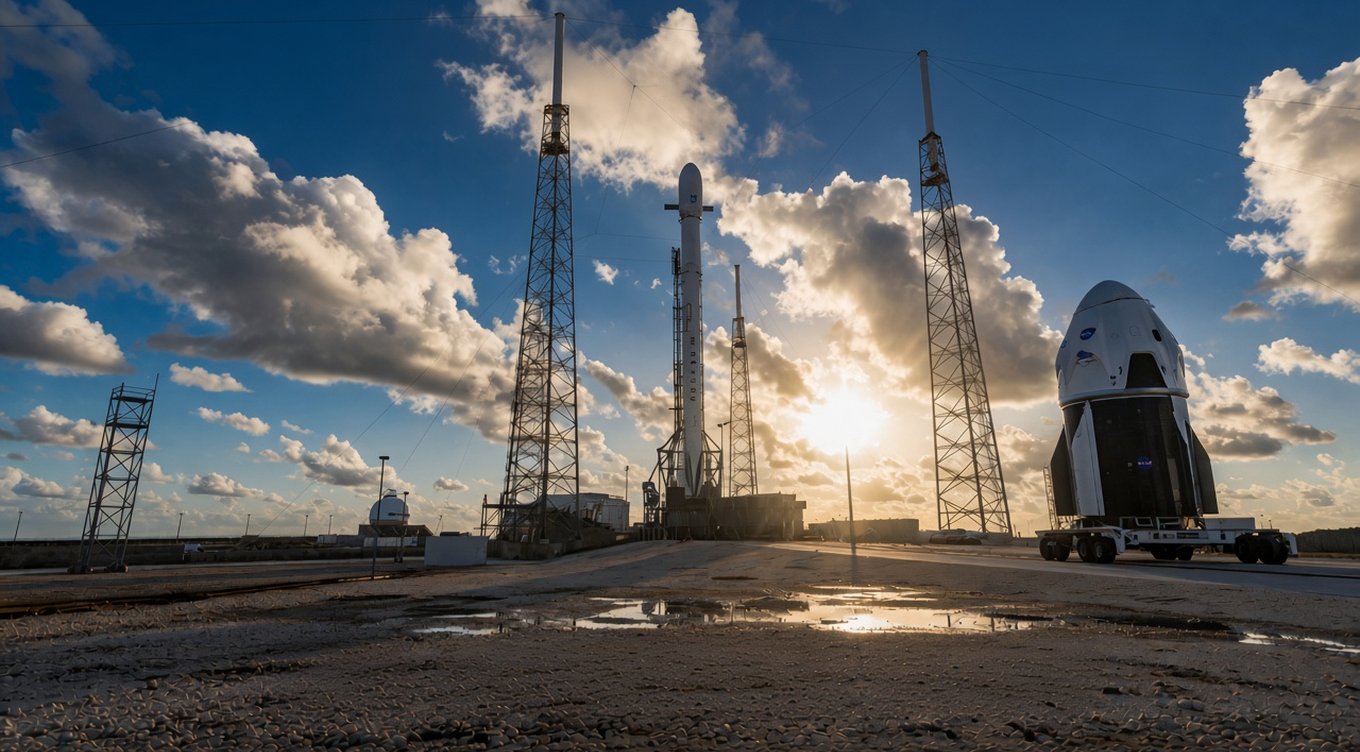
Start screen: Falcon 9 on the pad at sunset

Gameplay: walking the pad in an over-the-shoulder third-person view
Free · desktop browser recommended · WASD / arrows to move · mouse to look · Space to jump
What Is SpaceX Falcon 9 Launch Complex?
SpaceX Falcon 9 Launch Complex is a free educational Three.js 3D game world. You walk a model of Space Launch Complex 40 at Cape Canaveral, Florida, in an over-the-shoulder third-person view, collect a glowing gem at each of 14 landmarks, read a short lesson with a real photo at each one, and then take a quiz to earn the Pad Explorer badge. It runs in your web browser with WebGL, so there is nothing to download.
Fan-made for learning and fun. Not affiliated with or endorsed by SpaceX, and it does not show real launch operations.
What You Will Find on the Launch Complex
Each landmark has a glowing gem. Walk up to it and an info card fades in with a real NASA or SpaceX photo (credited on the card) and a short explanation of what the part does during a launch.
- Falcon 9 Rocket – the reusable two-stage rocket. Nine Merlin engines burning RP-1 kerosene and liquid oxygen power the first stage.
- Transporter-Erector & Launch Mount – carries the rocket from the hangar on rails, tips it upright and feeds it propellant, power and data through umbilical lines.
- Lightning Protection Towers – four tall towers linked by overhead wires so a strike hits them instead of a fueled rocket.
- Liquid Oxygen (LOX) Sphere – stores oxygen chilled to about −183 °C (−297 °F) inside double insulated walls.
- Tank Farm – long horizontal tanks of RP-1 fuel plus nitrogen and helium gases that purge lines and pressurize tanks.
- Rail Tank Cars – how large amounts of gases and super-cold liquids are delivered to the complex by rail.
- Flame Trench – the concrete channel under the pad that turns the engine blast sideways and away at liftoff.
- Falcon 9 Hangar – the Horizontal Integration Facility, where the stages and payload are joined lying down.
- Workshops & Storage – the small buildings, sheds and containers that hold tools, spare parts and generators.
- Pad Support Building – windowless buildings with the compressors, pumps and air conditioning that keep the rocket healthy.
- Camera & Observation Towers – steel lattice towers with a platform on top at the edge of the complex, where remote and tracking cameras film each launch.
- Space Launch Complex 40 – the history of the Cape Canaveral pad, first built for Titan rockets and rebuilt by SpaceX for Falcon 9.
- Dragon Spacecraft – the capsule that carries cargo and, as Crew Dragon, astronauts to the International Space Station.
- Tesla Model 3 – an electric car parked on site, and the story of the Tesla Roadster launched on Falcon Heavy.
Crystal Hunt and the Pad Quest Quiz
A counter at the top of the screen shows how many landmark gems you have found. Collect them all and a glowing purple portal pad appears beside Falcon 9. Step on it and you warp up to a high sky deck with a view over the whole pad, where the Pad Quest quiz asks 25 shuffled questions drawn from the landmark cards: Merlin engines and the Merlin Vacuum engine, grid fins and landing legs, hold-down clamps, lightning protection, super-chilled liquid oxygen and RP-1, the flame trench, the hangar and payload fairing, weather rules, Dragon's SuperDraco engines and the Falcon Heavy that launched a Tesla Roadster. Correct answers in a row build a streak bonus, and the final screen shows your rank, stars, accuracy and best streak. Get 18 or more right (70%) to earn the Pad Explorer badge.
Score 5 of 7 or better and you earn the Pad Explorer badge with three stars. Miss it and the gems reset so you can study the landmarks and try again.
Day, Golden Hour and Night
The sky changes on its own: a few minutes of daylight, then golden hour as the sun drops, then dusk and night. At night a Milky Way band and a starfield fill the sky and the lamps around the pad light up. To jump straight to one look, use the Day, Gold and Night buttons on the Play card.
How to Play
- Open the game. Go to the SpaceX Falcon 9 Launch Complex page in a desktop browser and wait for the progress bar to finish loading the 3D world.
- Sign in or play as Guest. Choose Sign In with Google or Guest, then press Play Now to lock the mouse and enter the world.
- Move and look around. Walk with W, A, S, D or the arrow keys, look with the mouse, press Space to jump and double-tap Space for a super jump.
- Collect the landmark gems. Walk to each glowing gem to collect it and open the landmark's info card. Press C to close the card.
- Take the Pad Quest quiz. After you collect every gem, step on the glowing purple portal pad beside Falcon 9. It warps you to a high sky deck, where you touch the quiz orb and answer 25 shuffled questions. Get 18 or more right (70%) to earn the Pad Explorer badge.
- Change the sky. Use the Day, Gold and Night buttons to see the launch complex at midday, golden hour or under the stars.
Controls
| Action | Key |
|---|---|
| Move | W A S D or arrow keys |
| Look around | Mouse (press Play to lock the pointer) |
| Jump / super jump | Space / double-tap Space |
| Close an info card | C |
| Menu / release mouse | Esc |
Multiplayer
Sign in with Google or play as Guest to get a nickname. Other people exploring at the same time show up in the Active Players list and walk around the pad as animated avatars.
How It Was Built with Three.js and WebGL
The launch complex is a Three.js game rendered with WebGL, the browser standard for real-time 3D graphics. The site, the rocket and the buildings are compressed GLB models that use meshopt geometry compression and WebP textures, about 17 MB in total. A progress bar shows the download, and the files are cached so later visits load almost instantly.
Movement and mouse-look use Three.js PointerLockControls with an over-the-shoulder third-person camera, plus simple physics for gravity, steps, walls and jumps. The sky dome uses a custom shader for the day-to-night cycle and the night sky. The landmark cards are drawn on canvas textures that float in the 3D world, and AWS serverless services handle sign-in and the live player list.
Want to make your own 3D browser game? Try these:
An Educational 3D Game World for STEM
Educational 3D game worlds let students learn by exploring instead of reading. Here, every stop on the pad is a small lesson in engineering and space science: rocket propellants, cryogenic storage, lightning protection, exhaust management, assembly and rollout. The quiz at the end checks what stuck.
For teachers
- It is free, runs in the browser and needs no installs or accounts beyond Google or Guest, so it fits a lab or computer-class period.
- Have students collect all 14 gems, then take the quiz. Use the Pad Explorer badge as the finish line.
- Follow up with a discussion: why is LOX stored in a sphere, and why does the pad need a flame trench?
More reading: Creating 3D virtual educational worlds and the advantages of WebGL and Three.js online games.
More Three.js Games and Worlds
- Planet Quest: Solar System Explorer, an educational space game where you fly past the Sun, the planets and a comet.
- Rocket Lander, a Three.js 3D rocket landing game.
- Space Wow, a 3D space shooter in your browser.
- FPS Game Starter, a Three.js first-person shooter you can learn to build.
- Endless Terrain, a procedural Three.js landscape.
- Browse all 3D games
Frequently Asked Questions
What is the SpaceX Falcon 9 Launch Complex 3D world?
It is a free educational Three.js 3D game world by Shane Brumback. You walk a model of Space Launch Complex 40 at Cape Canaveral in an over-the-shoulder third-person view and see the Falcon 9 rocket, the transporter-erector, the lightning towers, the LOX sphere, the tank farm, the hangar and more up close. It is fan-made and not affiliated with SpaceX.
Is it free and do I need to download anything?
It is free and there is nothing to download or install. It runs in a modern desktop web browser with WebGL, such as Chrome, Edge, Firefox or Safari.
Do I need to sign in?
Sign in with Google or choose Play as Guest, then press Play Now. Either way you get a player nickname for the live Active Players list. No payment is needed.
What are the controls?
Use W, A, S, D or the arrow keys to move and the mouse to look around. Press Space to jump and double-tap Space for a super jump. Press C to close an info card and Esc to release the mouse and open the menu. A desktop with a keyboard and mouse is recommended.
What can I learn from it?
Walking up to a landmark opens an info card with a real photo and a short lesson. There are 14 of them, including the Falcon 9 rocket and its Merlin engines, the transporter-erector, lightning protection, liquid oxygen storage, the RP-1, nitrogen and helium tank farm, rail tank cars, the flame trench, the integration hangar, camera towers and the Dragon spacecraft.
How does the crystal hunt and quiz work?
Every landmark has a glowing gem. Touch it to collect it and read its card, and a counter at the top of the screen tracks your progress. Once you have every gem, a purple portal pad appears beside the rocket. It warps you to a high sky deck for a 25-question quiz about the pad, with the questions and answers shuffled every time. You earn points and streak bonuses, a rank and up to three stars, and 18 or more correct (70%) earns the Pad Explorer badge.
Can I change the time of day?
Yes. The sky cycles from day to golden hour to night on its own, and the Day, Gold and Night buttons on the Play card let you jump straight to one. At night you see a Milky Way sky with stars, and the pad lights glow.
Can I play with other people?
Yes. Players who are exploring at the same time appear in the Active Players list and walk around the world as animated avatars.
Is SpaceX Falcon 9 Launch Complex built with Three.js?
Yes. It is a Three.js 3D browser game rendered with WebGL. It uses compressed GLB 3D models (meshopt geometry and WebP textures), PointerLockControls for mouse-look movement with an over-the-shoulder third-person camera, and AWS serverless services for sign-in and the multiplayer player list.
How long does it take to load?
About 17 MB of compressed 3D models and textures load the first time, usually in a few seconds on broadband. A progress bar shows the download, and the files are cached so later visits load almost instantly.
Can teachers use it in class?
Yes. It is a free, no-install STEM activity. Students explore the pad, read the landmark cards and then take the in-world quiz, which turns the visit into a short lesson on how a rocket launch site works.
How can I build a 3D world like this?
Start with the free Three.js tutorials on this site, such as the PointerLockControls first-person tutorial and the guide to loading and animating glTF models.